
轻松地从终端管理您的登录凭据。

项目描述
Pysswords 允许您从终端管理您的登录凭据。密码文件将保存到数据库路径_中的GnuGPG加密文件中。只有使用创建pyssword数据库的通行证才能解密密码文件。如果您想了解更多关于pysswords如何内部工作的信息,请查看“内部结构”部分。
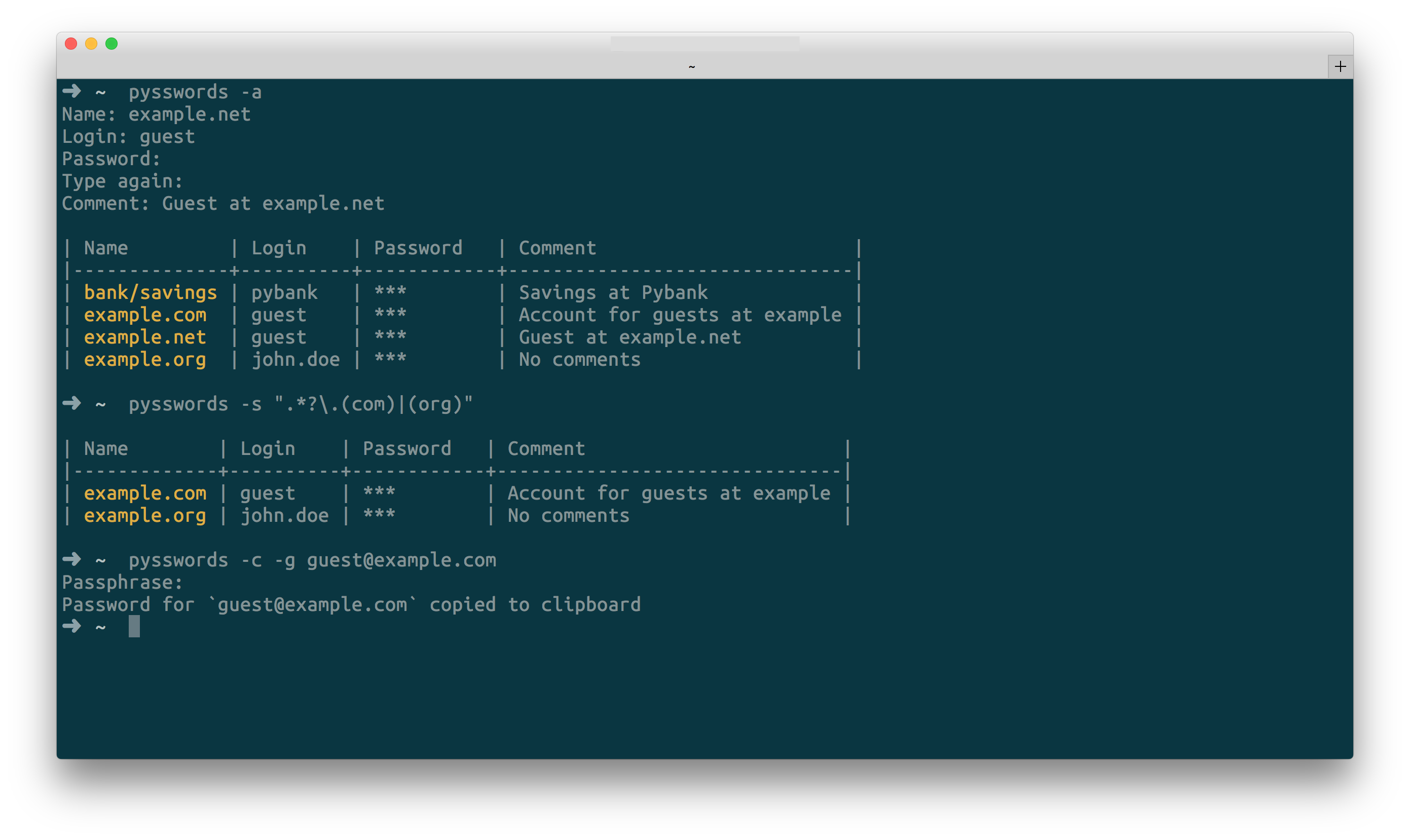
Pysswords控制台界面
主要功能
☑ 控制台界面
☑ 管理多个数据库
☑ 添加、编辑、删除凭据
☑ 将密码复制到剪贴板
☑ 将凭据列表示为表格
☑ 带颜色的输出
☑ 通过名称、登录或注释搜索凭据
☑ 使用正则表达式搜索
☑ 批量更新/删除凭据
☑ 通过全名语法选择凭据
☑ 凭据分组
☑ 导出Pysswords数据库
☑ 导入Pysswords数据库
☑ 从1password导入凭据
☑ 随机生成凭据密码
☐ 撤销/重做对数据库的更新
☑ 已实现功能,☐ 未实现功能。
安装
稳定版本 
pip install pysswords开发版本 

Linux/OSX |
Windows |
|---|---|


最新开发版本可以直接从GitHub安装
$ pip install --upgrade https://github.com/marcwebbie/pysswords/tarball/master快速入门
# create a new credentials database. Option: `-I` or `--init`
pysswords --init

# add new credentials. Option: `-a` or `--add`
pysswords -a

# get credential "example". Option: `-g` or `--get`
pysswords -g example

# edit credential "example". Option: `-u` or `--update`
pysswords -u example

# remove credential "example". Option: `-r` or `--remove`
pysswords -r example

# search credentials by "exam". Option: `-s` or `--search`
pysswords -s exam

# search credentials using regular expressions Option: `-s` or `--search`.
pysswords -s example\.com|org

# copy password from credential "example" into system clipboard.
# Option: `-c` or `--clipboard`
pysswords -c example

# print all credentials as a table with hidden passwords
pysswords

# print all credentials as a table with passwords in plain text.
# Option: `-P` or `--show-password`
pysswords -P

# specify other Pysswords database. Option `-D` or `--database`
pysswords -D /path/to/other/database

# delete database and remove all credentials
# Option: `--clean`
pysswords --clean

# shows help. Option `-h` or `--help`
pysswords --help

# shows version. Option `--version`
pysswords --version
教程
1) 同步您的数据库
Dropbox
在Pysswords数据库默认路径 ~/.pysswords 和在路径 ~/Dropbox 的Dropbox共享目录中
# move your Pysswords database inside your Dropbox directory
mv ~/.pysswords ~/Dropbox/.pysswords

# create a symbolic link to your shared .pysswords directory on the default path.
ln -s ~/Dropbox/.pysswords ~/.pysswords
Google Drive
在Pysswords数据库默认路径 ~/.pysswords 和在路径 ~/GoogleDrive 的GoogleDrive共享目录中
# move your Pysswords database inside your Dropbox directory
mv ~/.pysswords ~/GoogleDrive/.pysswords

# create a symbolic link to your shared .pysswords directory on the default path.
ln -s ~/GoogleDrive/.pysswords ~/.pysswords
2) 导出/导入Pyssword数据库
# export database to a pysswords database file called pysswords.db
# Option: `--export`
pysswords --export pysswords.db

# import database from pysswords database file called pysswords.db
# Option: `--import`
pysswords --import pysswords.db

# import 1password 1pif exported file
pysswords --import passwords.1pif/data1.1pif
3) 按名称分组凭据
Pysswords凭据处理每个名称的多个登录,通过名称对凭据进行分组
# create john credential
pysswords -a
Name: example.com
Login: john
Password: **********
Comment: No comment

# create doe credential
pysswords -a
Name: example.com
Login: doe
Password: **********
Comment:

# listing credentials
pysswords

| Name        | Login   | Password   | Comment    |
|-------------+---------+------------+------------|
| example.com | doe     | ***        |            |
| example.com | john    | ***        | No comment |
4) 使用全称语法选择凭据
您可以使用全称语法 login@name 选择分组凭据
pysswords -g doe@example.com

| Name        | Login   | Password   | Comment   |
|-------------+---------+------------+-----------|
| example.com | doe     | ***        |           |
5) 使用多个数据库
有时,为了更高的安全性,拥有多个不同密码的数据库是有用的。这可以通过使用 -D Pysswords选项来完成。
在指定目录中创建数据库(例如:~/databases)
# create personal Pysswords database
pysswords --init -D ~/databases/personal_passwords

# create work Pysswords database
pysswords --init -D ~/databases/work_passwords

# create junk Pysswords database
pysswords --init -D ~/databases/junk_passwords
向特定数据库添加密码
# add password to personal Pysswords database
pysswords -D ~/databases/personal_passwords -a

# add password to junk Pysswords database
pysswords -D ~/databases/junk_passwords -a
向特定数据库添加密码
# listing specific databases
pysswords -D ~/databases/junk_passwords
内部机制
加密
加密使用 GnuGPG 和 AES256 完成。了解更多信息,请参阅 pysswords.crypt 模块。
数据库路径
默认数据库路径为 ~/.pysswords。如果您想更改数据库路径,请向pysswords添加 --database 选项,并与 --init 一起使用。
pysswords --init --database "/path/to/another/database/"数据库结构
Pysswords数据库在目录层次结构中组织。每个凭据都是一个位于以凭据组命名的目录中的 .pyssword 文件。
一个空的数据库看起来像这样
pysswords --database /tmp/pysswords --init

tree /tmp/pysswords -la
# /tmp/pysswords
# └── .keys
#     ├── pubring.gpg
#     ├── random_seed
#     ├── secring.gpg
#     └── trustdb.gpg
添加新凭据后,数据库将看起来像这样
pysswords --database /tmp/pysswords -a
# Name: github.com
# Login: octocat
# Password: **********
# Comments:

tree /tmp/pysswords -la
# /tmp/pysswords
# ├── .keys
# │   ├── pubring.gpg
# │   ├── random_seed
# │   ├── secring.gpg
# │   └── trustdb.gpg
# └── github.com
#     └── octocat.pyssword
如果我们向组github.com添加更多凭据,目录结构将是
pysswords --database /tmp/pysswords -a
# Name: github.com
# Login: octocat2
# Password: **********
# Comments:

tree /tmp/pysswords -la
# /tmp/pysswords
# ├── .keys
# │   ├── pubring.gpg
# │   ├── random_seed
# │   ├── secring.gpg
# │   └── trustdb.gpg
# └── github
#     └── octocat.pyssword
#     └── octocat2.pyssword
贡献
阅读 Makefile
在 tests/test.py 中编写您的测试
如果一切正常,请推送您的更改并创建一个pull request。 ;)
许可协议(MIT许可协议)
MIT许可协议(MIT)
版权所有(c)2014-2015 Marc Webbie,http://github.com/marcwebbie
特此授予任何获得此软件及其相关文档副本(“软件”)的人,免费使用该软件的权利,包括但不限于使用、复制、修改、合并、发布、分发、再许可和/或出售软件副本的权利,并允许向软件提供方提供软件的人行使上述权利,前提是遵守以下条件
上述版权声明和本许可协议应包含在软件的所有副本或主要部分中。
本软件按“现状”提供,不提供任何明示或暗示的保证,包括但不限于对适销性、特定用途的适用性和非侵权的保证。在任何情况下,作者或版权所有者均不对任何索赔、损害或其他责任负责,无论源于合同、侵权或其他原因,无论源于、因之或与此软件的使用或其他方式相关。


下载文件
下载适用于您平台的文件。如果您不确定选择哪个,请了解更多关于安装包的信息。
源代码发行版
构建发行版
pysswords-0.0.12.tar.gz的哈希值
| 算法 | 哈希摘要 | |
|---|---|---|
| SHA256 | ff2f6bec5f0ad3adc674fea0adfd29983595d51cf5f91c0772249c856bd29500 |
|
| MD5 | d7f714b9086594d2d14820fa4990d653 |
|
| BLAKE2b-256 | 9a4934276af58750b60c58fe4c39a2c5fe1cbb77f2822ce56c8c1a89d46683c7 |
pysswords-0.0.12-py2.py3-none-any.whl的哈希值
| 算法 | 哈希摘要 | |
|---|---|---|
| SHA256 | 18646bf8fc6029ac02a253da92ef8ed8d18ebf37e5fb9623f7799ac8b3b7e0fa |
|
| MD5 | af61c54047916361a552bb6742bea7ed |
|
| BLAKE2b-256 | 2d7d89c250957f1259f6380e3afaf45397bba01b3481adf60a185172ea55ad0b |







